Category Archives: Games

games

Age of Mythology – Widescreen Resolution

Posted on .

In order to play the epic game Age of Mythology, or its expansion in widescreen, just add xres=1680 yres=1050 to the shortcut.
"C:\Games\Age of Mythology\aom.exe" xres=1680 yres=1050

Replace 1680 and 1050 with your own resolution.

UPDATE: From comments below..

Find the icon on your desktop you use to load AOM
Right click and choose properties
In the Target field add: xres=1920 yres=1200

Should be something like this:

age-of-mythology-widescreen-resolution-image1

Also, hello to PirateBay visitors. Have fun 🙂

UPDATE: This still works on Windows Vista, Windows 7 & Windows 8
City of Heroes (Europe) – Skip Updater

Posted on .

I used to play City of Heroes when it was first released back in 2004. The server used by the updater was sometimes unavailable which would stop me from playing the game. This was even when the server used for playing the game was fine, but it wouldn’t let me past the updating stage.

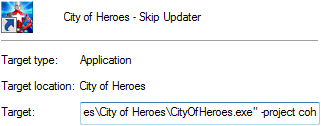
There was a quick workaround for this, which was to create a shortcut to the cityofheroes.exe file, and add “-project coh” to the target.

cohproject

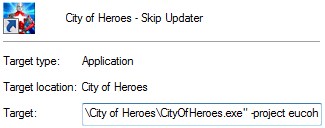
Nowadays, however, I play on the European servers, and their internal name for the game is no longer “coh”, but “eucoh”. Therefore in order to skip the updater the target must have “-project eucoh”. Again this is a shortcut of the cityofheroes.exe and not the updater.

eucohproject

This also allows a non-administrative user to play City of Heroes on Windows Vista as the updater requires Admin rights to run, but the game does not.

Battle for Middle Earth – Trailer Remover


What is it?

When installed, this file removes the 4 trailers at startup. Speeding up loading, getting you faster into the game.

How does it work?

You dont need to know this, just know that it works 😛 But for those that are curious . . .

EA placed all their config files in a file called ‘INI.big’, I extracted the config file “data/ini/video.ini” and renamed the file pointers for EAlogo, NewLineCinema, THX and intel movies to a non-existant file called “null”. Therefore the game now simply cant find the movie “null” and skips them.

How do I install it?

Extract bfme-nologo.zip to your Battle for Middle Earth directory.

Default is: “C:Program FilesEA GAMESThe Battle for Middle-earth ™”

Uninstall

Just remove the file, 00nologo.big, from the Battle of Middle Earth directory.

Download
  Battle For Middle Earth - Trailer Remover (5.5 KiB, 6,180 hits)