Category Archives: Windows

windows

Add Google UK search to Firefox

Posted on .

I upgraded to Firefox 4 and found the default google search was sending me to google.com. This meant US shopping results in dollars, amongst other things.

In your Firefox directory,

Windows:
C:\Program Files\Firefox or C:\Program Files (x86)\Firefox

Linux:
/usr/lib/firefox-xxxx/

You will find a folder called “searchplugins“. In there is google.xml

Make a copy of this and edit the contents so that each mention of “google.com” changes to “google.co.uk”. Also change the title (ShortName) from “Google” to “Google UK”.

In linux this is easy,
sed -e 's/google.com/google.co.uk/g; s/ShortName>Google/ShortName>Google UK/' google.xml | tee google-uk.xml

In windows it maybe a little more tricky as UAC gets in the way. The easiest way to do it, is to copy google.xml to your desktop, rename it to google-uk.xml, open it in notepad, make the changes and move it back.

Alternatively you can download google-uk.xml from here and place it in the searchplugins folder and restart Firefox.

Download
  google-uk.xml (2.3 KiB, 2,103 hits)
Suppress EventViewer ATi amdkmdag spam

Posted on .

If you have the ATi Catalyst Control Center installed then you may have come accross hundreds if not thousands of event viewer records from “amdkmdag” with a single line of data “UVD Information”.

This is supposedly the graphics driver notifying you that a peice of video has not passed HDCP checks (read: DRM for video).

To disable this and suppress the messages, make the following registry change,

Or download and run this as a file to make the change.

Download
  amdkmdag.reg (137 bytes, 3,896 hits)

Access Windows 7 admin shares from Linux

Posted on .

I was trying to access the administration shares (c$, admin$, etc.) from smbclient on a Debian/Squeeze machine and was being given:
tree connect failed: NT_STATUS_ACCESS_DENIED

If your Windows 7 workstation is on a domain, you won’t get this issue, however if it is on a workgroup then the following registry setting is required:

More information found at http://support.microsoft.com/kb/951016.

Downloading the following .reg file and running it on the workstation will make the above change.

Download
  LocalAccountTokenFilterPolicy.reg (334 bytes, 2,418 hits)

RPC over HTTP using Outlook 2003

Posted on .

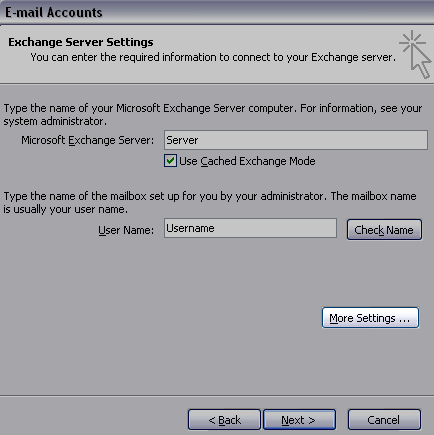
1. Create or Edit an Exchange E-mail account in Outlook.

2. Click on the “More Settings” button.

rpc-over-https-using-outlook-2003-image3

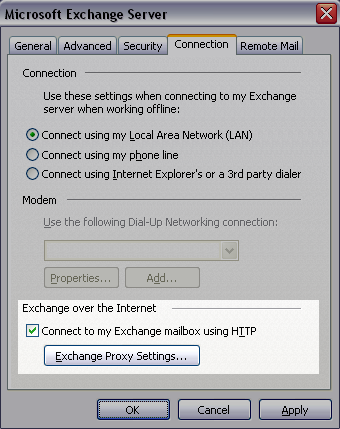
3. Click on the Connection tab…

4. Tick the box to “Connect to my Exchange mailbox using HTTP” and then click the button “Exchange Proxy Settings…”

rpc-over-https-using-outlook-2003-image2

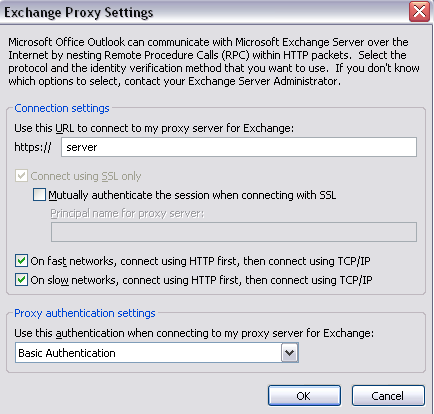
5. Enter the server name for Exchange/RPC server

rpc-over-https-using-outlook-2003-image1

6. I tick both boxes to use HTTP first so the user gets the same experience regardless of network they are on. Otherwise when only RPC over HTTP is available (the user is out of the office) Outlook takes a while to timeout its TCP connect before attempting HTTP.

7. I use Basic Authentication over SSL.

Microsoft Office Outlook 2003 crash on Windows Server 2003

Posted on .

We had just installed some extra RAM onto a Terminal Server running Microsoft Windows Server 2003 x86 (32-bit). We had also enabled Physical Address Extension with the /PAE boot.ini switch.

Following these changes Microsoft Office Outlook 2003 failed to start. Each time we loaded Outlook, it would crash complaining of a failure in outlook.exe, module mspst32.dll

We fixed this issue by installing Office 2003 Service Pack 3 (SP3).

According to this Microsoft KB article adding the /PAE switch was to blame.